Some of the content presented in this demonstration website is from: http://socialmediatoday.com/. Fore more exciting news visit their website.
If you want to try the features of this plugin log in using Admin Link and then go to this Widget page Link

Username: demoUser
Password: demoPass
Some Examples:
-
2014: The Year of ...

-
Self-Serve Custome...

-
Hashtags Have Help...

-
How Many Zombies?

-
Cyber Monday Is Co...

-
The Criteria of an...

-
5 Amazing Twitter ...

-
Preparing Your Lea...

-
Example of content





-
2014: The Year of Li...
I realize it's a tad early for the obligatory end-of-the-year prognostication piece in which marketers and advertisers alike provide their fearless forecasts Read more...
-
Preparing Your Lead ...
Businesses have enjoyed immeasurable success in digitally targeted marketing campaigns up through 2013, especially with social media giants Pinterest and Facebook offering exciting platforms for targeting audiences, and YouTube innovating In-Video marketing campaigns to draw attention to niche video watchers. Investments in mobile applications have grown well over 140% since 2011 while over 60 hours of video being uploaded every minute is a major contributing factor in how $1.8 billion in revenues have been generated since the same time period. With staggering figures being reported, it comes as an even bigger surprise the inefficiencies which accompany growing branding efforts throughout marketing campaigns around the world. As B2B spending trends head upward, tracking needs to grow equivocally, which it’s not. As we sneak our way towards 2014, incremental strategic changes need to be implemented into what we’ll dub as B2B lead nurturing strategies for 2014, highlighted below. Putting Data Out There Your business, inherently, wants to place viable bits of useful data across the internet, whether locally or globally, so the word about your initiatives is clearly searchable. You’ll use PPC advertisements, social media marketing advertisements, email marketing, video marketing and perhaps a slew of other data bits out there. One problem, however, is Read more >> -
2014: The Year of Li...
I realize it's a tad early for the obligatory end-of-the-year prognostication piece in which marketers and advertisers alike provide their fearless forecasts for the coming year. Well, truth be told, this is not one of those articles but rather an observation of something I just came across. For the record, I do plan on producing the aforementioned end-of-the-year prognostication piece at what I think is the appropiare time: sometime in mid-December. And while I won't give away the details, I will tell you the article will come with a twist, and will leave it at that. Ok, so why I do refer to 2014 as potentially being the year of living socially? First off, the title of my article is a paraphrasing of the title of the 1982 film The Year of Living Dangerously, starring Mel Gibson. In the movie, Gibson plays a young reporter who is trying to navigate the political turmoil of Indonesia. (Thank you, IMDB). Based on what I read, it appears the number of marketers who will be trying to navigate not the turmoil, but perhaps the terrain that is marketing and advertising, will be at an all time high when it comes to their use of social media. The "what" I am referring to is a recent eMarketer report, “Social Media Advertising: Seven Read more >> -
Evolution of Logo De...
 Here is another great infographic from my good friends at Glow New Media based in Liverpool called The Evolution of Logo Design: How famous brand identities have developed. The infographic shows how some of the World's most iconic logos began and have developed over the years into the recognisable brands we know today. The infographic displays logo evolution for the following brands: Internet Explorer, IBM, Nokia, Ford, Apple, Pepsi, Microsoft, Cannon, BBC, Kodak, Atari, Volkswagen and British Airways. Please let me know which is your favourite logo featured in the infographic by leaving a comment or by posting on Facebook, Twitter or Google plus. Here you go: Read more >>
 -
5 Tips for Sharing Y...
 If content is king, then social media is queen. And let's just say the king doesn't get much done without the queen's nod of approval. The same principle applies to your business blog. You need great content to capture attention and interest, but you need great promotion to get people to consume your content in the first place. This blog post offers some quick tips for sharing your blog posts on social networks to get more traffic, more leads, and more customers via your website. 1. Create custom headlines and copy for your social media shares. The copywriting doesn't end after you publish your blog posts. You should craft custom announcements and headlines for each social network and each share. For example, if you're sharing your new blog post on Twitter, don't use the same copy/text when you share on Google Plus. Take time thinking about your audience on each network and your format. Again, Twitter and Google Plus are very different types of social networks with different text restrictions and different "sharing norms" at play. Be strategic with every share but more importantly, put thought into each social post. 2. Share each post multiple times. Simply announcing your new blog posts on Twitter Read more >>

We appreciate you interest in this plugin. All changes done will be removed at 0:00 GMT, each day, and this demo website will be reset at that time.



Official Website: wpindeed.com


The easiest way to display tour posts based on your imaginations
Popular Custom Random Listing Posts is a very powerful plugin/widget for WordPress which displays your posts and pages with or without thumbnails based on popularity for each post/page (visitors or visits), your custom settings or a random listing. It’s the perfect solution for any kind of website, eCommerce or simple blogs and it comes with full customization options.

What is P&C&R Listing Posts for WordPress?
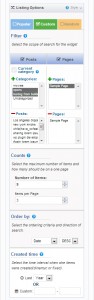
Popular&Custom&Random Listing Posts for WordPress is a great little plugin that gives you the ability to display your content the way you really want. The plugin has a large array of features that gives you full control over what and how should be displayed in your WordPress website. You can choose to display every combination of Title, Content, Excerpt, Thumbnail. Personalize every aspect of the way the content is being displayed, starting with the entire box, down to every single link. Unlike most of the similar widgets out there, PCR Listing Posts allows you to select the order in which the posts will be displayed based on number of comments, title and date, or you can leave it to random ordering.
One of the most important feature is the “Popular” section where you can decide if you want to display the posts or pages based on the number of visits or visitors. The plugin tracks all your posts and pages and keeps your visitors or visits. Your Top of Posts can be created based on a specific period of time or dynamically on the last Week, Month or Year.
Another important feature is that now you can decide where the widget can be visible or not. From the entire list of Post, Pages and Categories you will select by yourself where should not be saw the widget from the sidebar.

You can see more on Plugin Website Page: http://wpindeed.com
In the Future…
The great thing about this plugin is that it’s derived from need and future changes will be made based on that. The more people will use this plugin the more feedback we are likely to receive and the best suggestions for improvement will be added in the next versions.
Requirements
If you want to use this plugin, all you need to do is install WordPress 3.5+, and install the plugin.
List of Features
- Post and Pages included
- Popular Posts
- Visitors Tracking
- Visits Tracking
- Custom Display Section
- ShortCode Generator
- PHPCode Generator
- Visibility Settings
- Items Pagination
- “Current Category” selection
- Custom Selections of Categories, Posts
- Custom exclude specific Posts and Pages
- Pick from a specific time interval or period of time
- Custom Selections of Categories, Posts
- Custom exclude specific Posts and Pages
- Helpful Description
- Multi Language
- Widget Box Options
- Widget Box Title
- Filter Content
- Ordering Content
- Number of Posts to display
- Select from one or all categories
- Filter by Comments
- Filter by default
- Filter by Title
- Filter by Date
- Order Ascendent/Descendent
- Enable Random display Posts
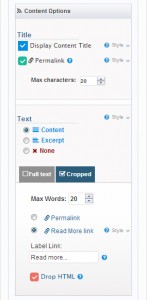
- Display or not Post Title
- PermaLink on Post Title
- Number of characters of title
- Full Content Display
- PermaLink on full content
- Part of Content Display
- Number of words to display
- PermaLink on part of content
- Activate “Read More” Link
- Label “Read More” Link
- Disable display content
- Drop HTML
- Content display mode
- Display Thumbnails
- Thumbnail width option
- Thumbnail height option
- Permalink on Thumbnail
- Default Thumbnail
- Custom Default Thumbnail
- Hide Widget from Sidebar